Meta AI Terms of Service Update: Small Business Guide
Meta quietly removed contentious phrasing from its AI policies. Here is how the update affects business photos, copyrights, and brand protection online.

Manik Hossain
Web designer, WordPress expert and SEO specialist

Meta now uses your public posts, product photos, and captions to train its generative models, including Llama. This meta ai terms of service update small business owners face means any creative work you publish to Facebook or Instagram feeds their systems unless specific local privacy laws block it.
A local woodworker sharing custom furniture builds or a boutique posting original textile patterns cannot simply toggle an off switch inside standard account settings. Private direct messages stay excluded from model training, but public business pages are open territory. If you run a business outside the European Union or the UK, Meta offers almost no direct way to stop this scraping. Managing this change comes down to drawing a hard line between what you post to social feeds and what you keep on your own website.
What did Meta change in its AI training terms?
The language removed after public pushback
Meta stripped a clause that said any “public content” posted on Facebook or Instagram could be used “without restriction” to train its Llama‑based generative models. The sentence also gave Meta permission to let “third‑party crawlers” harvest the same data for internal research. After creators organized a petition, the wording was replaced with a narrower statement: only content that is publicly accessible and not marked with a “no‑AI‑training” label may be used. The new text adds a short paragraph about a “privacy objection form” that businesses can submit to request exclusion.
What stayed, The agreement still says Meta may process “public posts” for “service improvement.” That language was not removed, so any photo, video, or text that appears on a public business page can still feed the model unless the owner files an objection.
The difference between scraping policies and platform terms
Scraping policies are Meta’s external rules for developers who want to collect data via the Graph API. Platform terms are the contract you agree to when you log in. The revision only touched the contract language; the API policy still allows “authorized crawlers” to access public pages for analytics. In practice, a shop that posts a new dress design on its page is still covered by the API rule, even though the contract now requires a clear opt‑out flag.
| Area | Before update | After update |
|---|---|---|
| Third‑party crawlers | Unlimited rights to harvest public content for AI | Rights limited to data not flagged via privacy objection |
| Internal generative models | Free use of all public posts | Use limited to unflagged public posts only |
For a small retailer, the practical steps are: 1) file a privacy objection form for any image you consider core IP, 2) keep product photos on your own domain and reference them with a canonical URL, and 3) treat your Facebook page as a marketing channel, not a storage vault. If you are selling products on an owned store, keep the high‑resolution files off Meta. When you plan a site redesign and URL structure planning, make sure the new URLs are not duplicated on your social feeds. The remaining clauses still give Meta legal ground to train on anything left public.
Does Meta use my business page posts to train AI?
Yes. If your page is public, Meta feeds your text, graphics, and video to its generative models.
Public content vs private customer messages
Does Meta train AI on business data? The answer comes down to privacy settings.
Public page updates, product photos, and Reels sit directly in the training set for Llama. In contrast, one-to-one direct messages between you and your customers stay excluded. Messenger chats and Instagram direct messages remain private, meaning Meta does not use private client inquiries or order details to teach its systems unless someone tags an AI assistant directly in the chat.
Keep in mind that personal profiles can be set to private. Business pages cannot. Every post published from a professional brand profile exists in public view, which strips away the default privacy protections given to locked personal accounts.
Facebook business page ai scraping mechanics
Automated scrapers crawl your timeline continuously. These systems ingest far more than raw copy.
- Captions and hashtags: Meta collects every line of marketing copy you publish.
- Static graphics: Computer vision reads product designs, logos, and overlay text.
- Customer comments: Public replies, feedback, and your direct answers get processed for tone and conversational context.
Putting a copyright notice in your post caption will not make scrapers cease collection. Once you publish marketing assets onto a public feed, the platform ingests them as raw training material.
Does Meta own the product photos and content I post on my business account?
Meta does not own the photos, videos, or copy you publish. You keep your copyright. What changes is what the company can legally do with those files once you upload them to Instagram or Facebook. Operational rules grant permissions that function almost like ownership in practice.
Non-exclusive license grants explained
Every upload activates a broad contract. You grant Meta a non-exclusive, transferable, sublicensable, royalty-free, worldwide license to host, distribute, modify, and display your work.
Two terms carry the real weight: sublicensable and royalty-free. Meta does not need to purchase your catalog to train systems like Llama. By hitting publish, you give the platform permission to process those files without payment. While you retain the underlying copyright, the company can parse your color palettes, lighting setups, and packaging details across thousands of posts.
Instagram copyright ai training small business risks
Small brands face an uneven fight here, especially makers selling ceramics, apparel, or hardware with recognizable silhouettes. Computer vision pipelines parse your styling, product proportions, and branding marks.
Enforcing your rights gets messy quickly. A standard DMCA notice works well when a dropshipper downloads your exact photo and runs it on a storefront. Automated reporting forms fall short when an AI tool produces an image derived from your aesthetic. Platform tools check for matching source files, not algorithmic weights stored during model training. When a competitor prompts an image generator to mock up designs modeled after your catalog, standard intellectual property forms provide no clear remedy. The result is synthetic competition built directly from your product development time.
| Asset Type | Who Owns Copyright? | Meta's Usage Rights | Used for AI Training? |
|---|---|---|---|
| Original Product Photos | Your Business | Non-exclusive commercial license | Yes (Public posts only) |
| Captions & Public Comments | Your Business | Platform display license | Yes |
| Private Direct Messages (DMs) | Sender / Business | Encrypted transmission | No (Excluded from training) |
| Paid Ad Creatives | Your Business | Ad delivery & performance analysis | Yes (Once run publicly) |
| Watermarked Brand Graphics | Your Business | Platform display license | Ingested, but trademark remains yours |
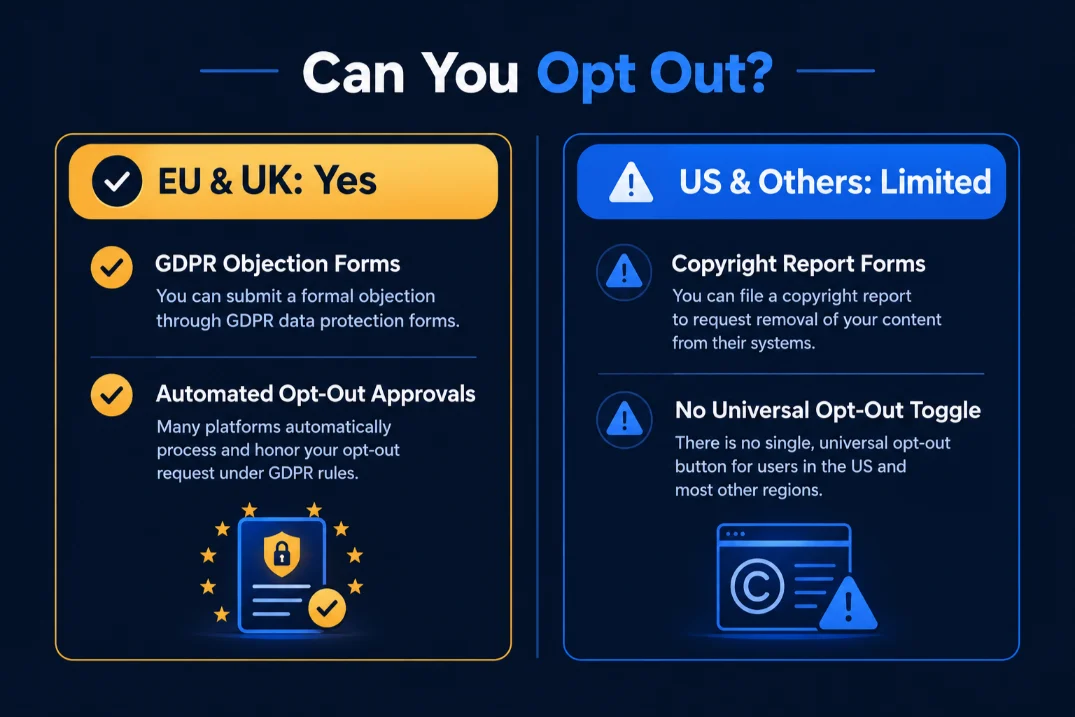
Can small businesses opt out of Meta's AI data scraping?
Regional privacy rules create an isolated regulatory island
Meta only offers a privacy objection form to users in the European Union and the United Kingdom. Those jurisdictions enforce GDPR or the UK Data Protection Act, which give data subjects a right to object to automated processing. Outside the EU/UK, local law does not yet require Meta to provide a formal opt‑out, so the button never appears on the account settings page.
| Region | Form available? | Reason |
|---|---|---|
| EU | Yes | GDPR article 21 |
| UK | Yes | UK DPA 2018 |
| US, Canada, Australia | No | No statutory right to object to AI training |
Because the form lives in a regulatory “island,” businesses in other countries must rely on Meta’s general privacy settings, which do not stop data from being added to Llama‑style models.
Submitting formal objections
If the business is based in the EU or UK, follow these steps:
- Log in to the Meta Business Suite.
- Open Settings → Privacy → Data Rights.
- Click Submit an objection.
- Choose AI training as the processing purpose.
- Attach a short note explaining that the catalog contains copyrighted product images.
- Confirm and wait for an email receipt.
Meta typically replies within 30 days. The response may confirm removal of future uploads, but it does not erase data already used to train generative models. Legally, a small shop can request that Meta stop ingesting new content, yet it cannot force the company to delete material already turned into synthetic data. The objection form only blocks future processing; existing model weights remain unless Meta issues a separate retroactive deletion, which it does not promise.
For businesses that sell through an owned store, protecting images before they appear on a public page is the safest route. When planning a site redesign and URL structure, keep canonical URLs stable to reduce the chance that Meta re‑crawls older versions of the same assets.
How does Meta's updated privacy policy affect small businesses?
Meta uses public posts, photos, and captions to train its generative models, including Llama. If you run a Facebook page or a public Instagram account for your shop, your product photography is part of that training pool.
Long-term risks for custom product designs
When you upload photos of original jewellery, pottery, or apparel patterns, generative tools study those visual traits. A competitor or consumer can ask an AI generator for similar items. The tool outputs a design variation built directly on your styling, texture, and composition.
You receive no attribution, no backlink, and no licensing payment. The original creator carries the cost of product development, while the model reproduces the style on demand. Adding a visible watermark over critical design details and sharing finished pieces rather than work-in-progress sketches helps reduce how easily these models isolate your methods.
Third-party AI tools versus platform crawlers
Cutting off social networks entirely is rarely practical. Hiding your work protects original images, but it also chokes off customer acquisition.
| Channel | Discovery potential | Asset control |
|---|---|---|
| Meta feeds | Fast initial exposure to new buyers | Meta uses content to train its tools |
| Self-hosted store | Search traffic from specific buying intent | You own your files, images, and user data |
Running campaigns on Meta rents attention from a closed network. You pay to reach people, but Meta retains the customer activity logs and trains on your creative assets. When you capture buyers on your own website, you keep the buyer history and the direct contact details. Platforms change their policies whenever they want. Keeping your core assets on your own domain prevents external terms from dictating how your work is used.

How to protect your brand's intellectual property on Meta platforms
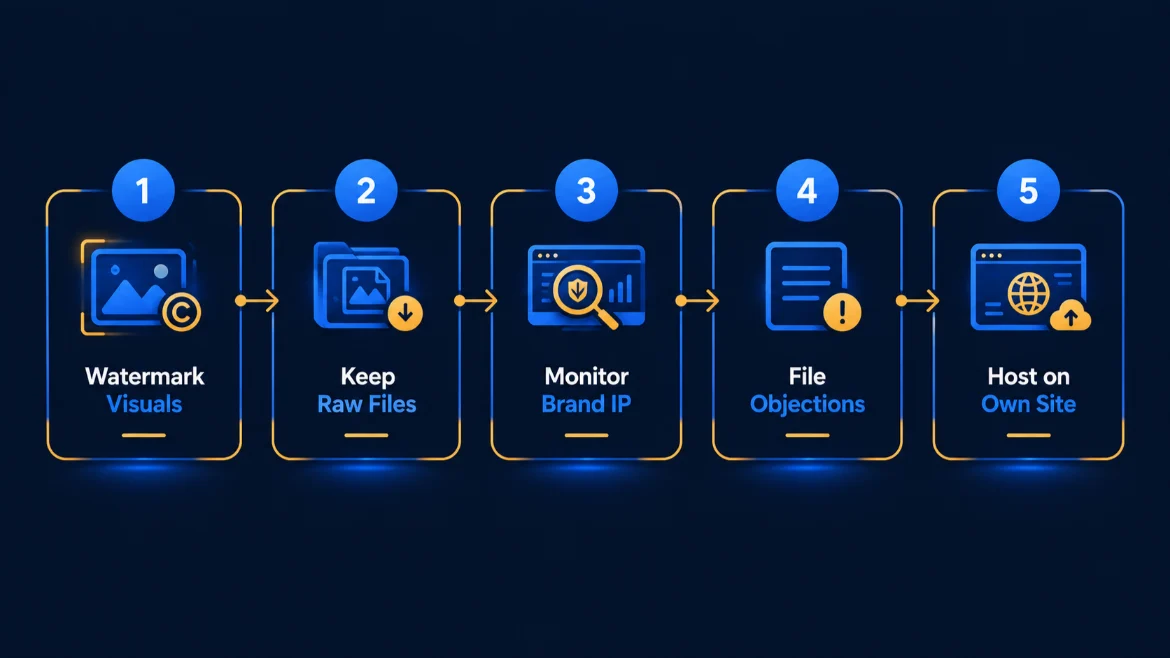
You cannot stop Meta from updating its policies, but you can control what files you feed into its network. Treating social feeds as temporary billboards rather than permanent asset libraries protects your work from being ingested by generative models.
Practical protection steps for product imagery
Raw, high-resolution photography gives training models clean data to replicate. You can disrupt automated ingestion by changing how you export files for social feeds:
- Apply semi-transparent visible watermarks across high-contrast focal points of the image, rather than tucked into an empty corner where a crop tool removes them.
- Add steganographic signatures or noise patterns using free tools like Mist or Glaze. These tools inject tiny pixel-level changes that look normal to human buyers but corrupt the feature maps used by AI scrapers.
- Reduce uploaded image resolution to 1080 pixels on the longest edge, compressed to 72 DPI. Keep the uncompressed master files off social networks entirely.
Owning the canonical home for commercial content
Shift your public posts from primary product displays into simple traffic drivers. Post short teasers, cropped angles, or brief clips on Facebook and Instagram, then link directly to the full media on your domain.
Publish your master product specifications, size charts, original copy, and 4K zoom photography solely on your website. Set an explicit canonical URL in your site header for every item. When search engines index the page first, you establish public timestamp proof of original ownership.
If you are currently selling products on an owned store, ensure that third-party scrapers cannot take your catalog without friction. If you plan a site redesign and URL structure planning, lock down image hotlinking in your server settings so social networks pull preview cards from your meta tags instead of your raw asset directories.
Take your brand assets off rented ground. Set up a fast, self-hosted storefront today so your creative work, inventory data, and visual media remain entirely under your direct ownership.
Frequently asked questions
What did Meta change in its AI training terms?
Meta clarified its policy after pushback over how it handles third-party web content. Language that suggested unrestricted scraping of outside websites was dialed back. Still, the updated terms confirm that Meta feeds public posts, captions, comments, and images from Facebook and Instagram into its Llama generative models. Private customer exchanges remain untouched by these specific automated systems.
Does Meta use my business page posts to train AI?
Yes. Everything you publish on a public Facebook business page or professional Instagram feed feeds their machine learning systems. Photos, captions, and promotional videos are all eligible source data. Meta does draw the line at private communication. Direct messages through WhatsApp, Messenger, and Instagram Direct are excluded from training datasets, so your private customer quotes and orders stay confidential.
Can small businesses opt out of Meta's AI data scraping?
Most businesses cannot turn it off. Only accounts based in regions with strict legal protections, like the European Union under GDPR or the United Kingdom, can submit an official privacy objection form. For businesses in the United States and other markets, Meta provides no account setting or toggle to stop the data ingestion. You have to remove the content to protect it.
Does Meta own the product photos and content I post on my business account?
You keep your intellectual property and copyright. Meta does not own your original photography or design work. The catch sits in the platform's standard licensing agreement. By uploading files, you grant Meta a broad, royalty-free license to distribute, display, and process your media. That license gives them legal clearance to use your public images and text to build commercial AI tools.
Written by Manik Hossain
Web designer, WordPress and WooCommerce expert, SEO specialist. 7+ years, 550+ websites, 185+ clients worldwide.
Work with meKeep reading

WooCommerce or Shopify: how I actually decide
Four questions about your catalogue, your team and your margins. The answers usually pick the platform for you.